
Last year, Canada Health Infoway and other AI Scribe Programs gave eligible primary care clinicians opportunity to test the benefits and capabilities of AI-powered documentation tools.
Now, as individual licence terms begin to expire, providers are deciding whether to continue using an AI Scribe and if so, which option makes the most sense for their clinic. Visit types, documentation style, editing needs, and how often the tool fits into the clinic day are all considerations that will shape the answer.
If you’re a clinician who joined the program and are preparing to sign another contract, it’s worth taking a step back to review what worked, what did not, and what you want your next AI Scribe option to support.
Some providers may choose to continue with the AI Scribe they used during their funded period. Others may use this opportunity to compare available options before making a commitment, and if you use AccuroEMR, Accuro AI Scribe, powered by Heidi is a practical option to include in that review.
Choosing what comes next does not have to mean evaluating every option on your own. Your regional Practice Consultant can help you review:
- Accuro AI Scribe, powered by Heidi
- Other available AI Scribe options
- Documentation tools already available in Accuro, including templates, macros, encounter note structure, and visit-type-specific charting habits
The goal is to help you understand your options and find the best fit for your clinic.
Before comparing costs or contracts, it may be worth asking a simpler question: What actually changed while you were using an AI Scribe?
A few questions can help guide the discussion:
- Did notes get completed closer to the patient visit?
- Did you still need significant editing?
- Did the scribe help more with certain visit types than others?
- Did evening or weekend charting change?
- Did the tool fit naturally into your clinic day, or did it add steps?
- Did the scribe fit your visit mix and documentation style?
Some providers may find that an AI Scribe supports most visits, while others find it works best for specific appointment types. Some may discover that editing time offsets part of the benefit.
Whatever your experience, all of those findings are useful when deciding what comes next.
While your experience should drive the decision, numbers can provide additional context.
The AI Scribe Value Calculator, included below, can help you compare the cost of a scribe against how often you use it and how much documentation time it returns.
You can use it to estimate:
- Time returned to documentation
- Cost per scribed encounter
- Cost per clinic day
These numbers are not a guarantee. They are simply a way to make the decision more concrete before signing your next contract.
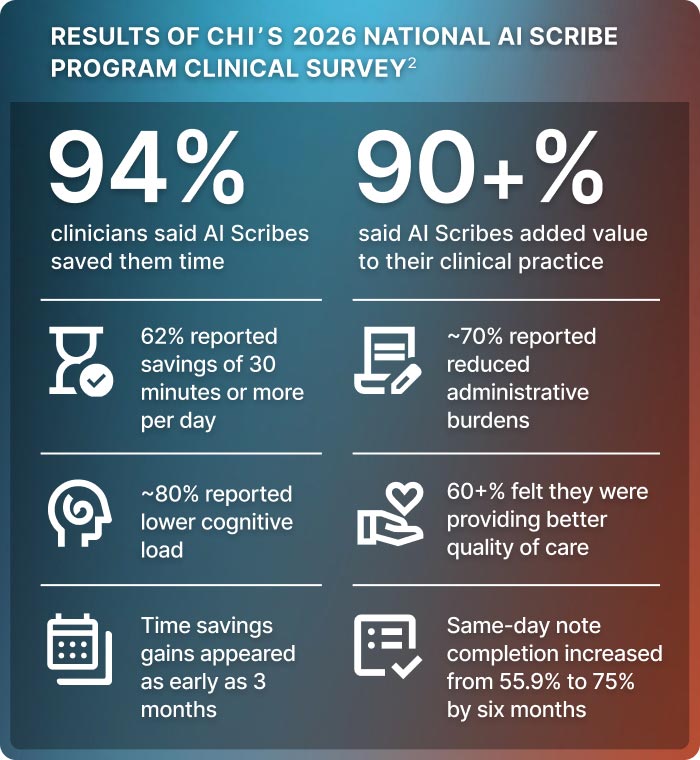
For many Accuro users, the practical value is where the scribe workflow happens. Accuro evaluated multiple AI Scribe tools before selecting Heidi as the partner behind Accuro AI Scribe, and the focus went beyond simple note generation to consider the same things providers and clinics value:
- Support for real workflows
- The ability to review, edit, and approve notes before saving
- Support for templates and note types, including SOAP notes, referrals, and patient summaries
- Security and certifications needed for clinical use
- A more connected EMR experience
The result is AI-supported documentation that happens directly within Accuro EMR. Reviewing the draft, making edits, confirming accuracy, and saving the final note to the patient chart all happen in the EMR without copying and pasting notes from an external platform or relying on a separate "push to EMR" step. Users can also prepare for a visit by choosing relevant information from the patient chart and using it to support the draft note, referral, or patient summary.
If your funded AI Scribe term is ending, now is a good time to review what worked, what did not, and what you want your next solution to support.
Still comparing options? Your Practice Consultant can help you review what is available and how each option may fit your clinic. Fill out our form to be connected open_in_new .
And if you’re ready to proceed with Accuro AI Scribe, start onboarding in Accuro Admin Centre open_in_new .
References: